You’ve seen the headlines: “I simulated my market launch with 44 AI agents.“ You’ve probably even read the MiroFish setup guide and got it running locally.
But now comes the real question: what do you actually do with it?
Running MiroFish is the easy part. Getting useful, actionable market intelligence out of it – that’s the skill. I’ve spent the last few months running simulations for multiple product ideas, and in this guide I’ll share exactly how to use MiroFish AI to validate product decisions, test messaging, and uncover blind spots before you write a single line of code.
Before you begin: If you haven’t installed MiroFish yet, start with the MiroFish Setup Guide first, then come back here.
MiroFish AI Setup Walkthrough
Getting MiroFish AI running takes about 10 minutes: install the tool, prepare your seed documents, and connect your simulation configuration. This walkthrough covers the exact steps, from first launch to your first completed market simulation.
What Is MiroFish AI?
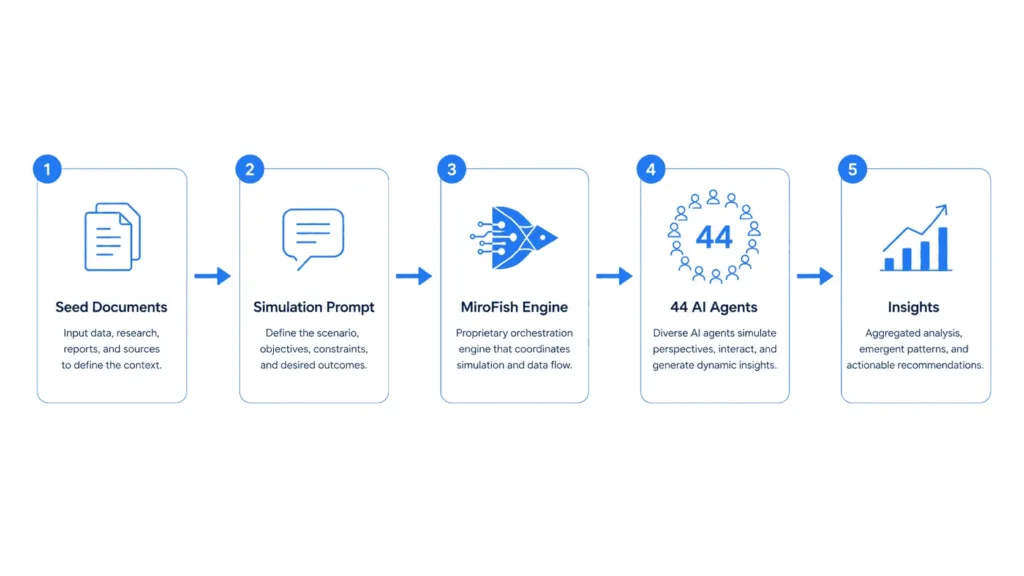
MiroFish is an open-source AI market simulation engine that spawns multiple AI agents representing different market personas – customers, competitors, investors, journalists – and runs a simulated market scenario. Each agent acts based on its persona’s motivations, biases, and knowledge, giving you a surprisingly realistic preview of how a real launch might play out.
Think of it as a focus group with 44 participants, running 24/7, costing pennies per session.
Step 1: Prepare Your Seed Documents
Your simulation is only as good as the context you give it. Before running anything, gather three things:
1. Company & Product Brief
Write a 1–2 page document covering:
| Section | What to Include |
|---|---|
| Problem statement | What pain point does your product solve? |
| Solution description | How does it work? Keep it simple – agents aren’t domain experts |
| Target customer | Who buys this? Be specific about demographics and psychographics |
| Pricing model | Free tier? Subscription? One-time? Per-seat? |
| Current stage | Idea? Prototype? Beta? Live with paying customers? |
2. Market Context
- Competitor landscape – Who are the top 3–5 competitors and their positioning
- Market trends – What’s happening in the space right now
- Regulatory factors – Any compliance or legal considerations
3. Buyer Persona Definitions
Define 3–5 personas that would interact with your product. Be specific:
Persona: "Indie Founder Sarah"
- Runs a 3-person B2B SaaS
- Budget-conscious, technical background
- Has been burned by expensive tools that her team never adopted
- Active on X/Twitter, reads Hacker News and Indie Hackers
- Primary decision driver: ROI and time-to-value
- Secondary concern: ease of onboarding for non-technical team members
Pro tip: The more specific your personas, the more nuanced your simulation results. Generic personas produce generic answers.
Step 2: Write Effective Simulation Prompts
This is where most people get it wrong. A weak prompt produces vague, useless output. A good prompt produces insights you can actually act on.
The Anatomy of a Good Prompt
Here’s a template you can use for any simulation:
[SCENARIO]
You are participating in a market simulation for {Product Name},
a {one-line description}.

[CONTEXT]
Background: {2-3 sentences about the market}
Product details: {key features and positioning}
Target users: {who this is for}

[YOUR ROLE]
You are {Persona Name}, a {short description}.
Your background: {relevant experience / bias}
Your goals: {what you want from a product like this}
Your concerns: {what would stop you from buying}

[TASK]
Review the product description below and respond as {Persona Name}:
1. Would you try this product? Why or why not?
2. What is your biggest concern?
3. What would need to be true for you to become a paying customer?
4. How would you compare this to {competitor}?
5. What would you tell a colleague about this product?

{Product description}
Real Example: SaaS Analytics Tool
Here’s a prompt I used to simulate a launch for a (currently hypothetical) AI analytics product called “DataLens”:
[SCENARIO]
You are participating in a market simulation for "DataLens", an AI-powered
analytics platform that turns raw product data into executive-ready reports in minutes.

[CONTEXT]
Background: Business intelligence is a $30B market dominated by complex
tools like Tableau and Power BI that require dedicated analysts. A new wave
of AI-native tools is making analytics accessible to non-technical teams.
Product details: Natural language querying, automated report generation,
Slack-native alerts, pay-per-report pricing ($5/report, no minimum).
Target users: Product managers, startup founders, and marketing leads at
companies with 10–200 employees.

[YOUR ROLE]
You are "Vikram", Head of Product at a 50-person B2B SaaS company.
Your background: 8 years in product management, burned by expensive tools
your team never used, skeptical of "AI-powered" claims after trying several
duds.
Your goals: Find a way to get weekly product metrics without hiring a data
analyst. Need something my whole team can use without training.
Your concerns: Data accuracy, integration complexity, vendor lock-in,
hidden costs.

[TASK]
Review the description below and respond as Vikram:
1. Would you try DataLens? Why or why not?
2. What is your biggest concern?
3. What would need to be true for you to become a paying customer?
4. How would you compare this to Metabase or Tableau?
5. What would you tell a colleague about DataLens?
Why this works: Vikram has a specific background, specific goals, and specific concerns. The prompt forces the agent to role-play authentically rather than giving a generic “looks great!” response.
Step 3: Run Your First Simulation
Once your prompts are ready, configure your agents and run.
Configuration File
Create a simulation-config.yaml:
simulations:
  - name: "SaaS Launch Validation"
    agents:
      - persona: "Indie Founder"
        count: 10
        model: "gpt-4o-mini"
      - persona: "Enterprise Buyer"
        count: 5
        model: "gpt-4o"
      - persona: "Investor"
        count: 3
        model: "gemini-2.0-flash"
      - persona: "Competitor"
        count: 3
        model: "gpt-4o-mini"
      - persona: "Industry Analyst"
        count: 2
        model: "gpt-4o"
    prompt_file: "prompts/saas-launch.yaml"
    rounds: 3
    output: "results/saas-launch/"
Launch the Simulation
mirofish run --config simulation-config.yamlWhat Happens Next
Each agent starts responding in its persona’s voice. You’ll see responses streaming in real-time:
- “Indie Founder” agents will ask about pricing, time-to-value, and integration effort
- “Enterprise Buyer” agents will question security, compliance, and support
- “Investor” agents will probe market size and defensibility
- “Competitor” agents will challenge your differentiation claims
Some responses will surprise you. That’s the point.
Estimated run time: 15–20 minutes for a 44-agent simulation
Estimated cost: ~$0.01 for GPT-4o-mini agents, ~$0.20 for GPT-4o agents
Step 4: Interpret the Results
Not all agent feedback is equally valuable. Here’s how to separate signal from noise.
What To Pay Attention To
| Signal | Why It Matters |
|---|---|
| Unexpected objections | An objection you didn’t anticipate is usually hiding a real risk you need to address |
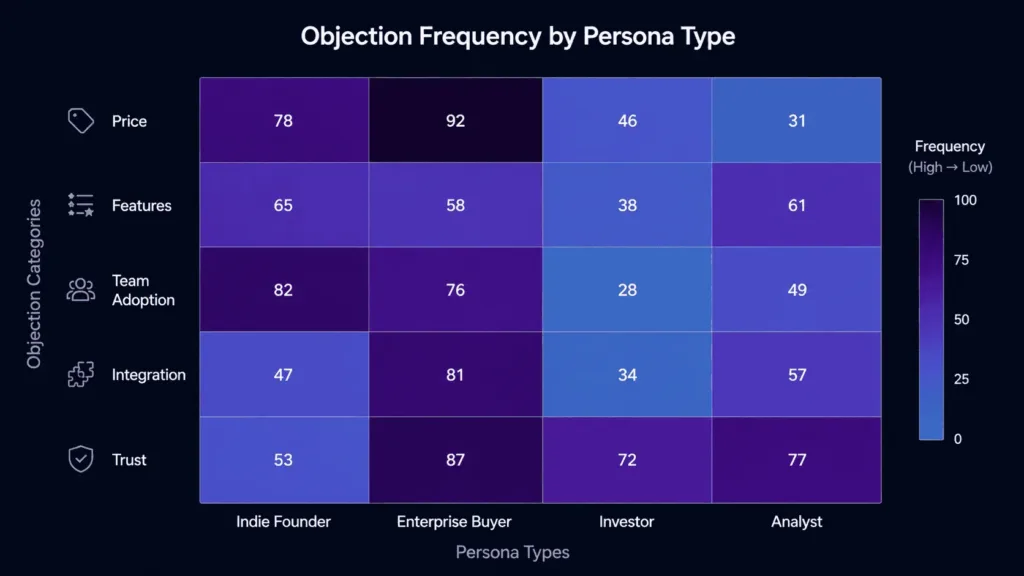
| Patterns across personas | If 3+ different personas flag the same issue independently, it’s a real concern |
| Emotional reactions | Strong positive or negative responses reveal what truly drives decisions |
| Spontaneous competitor mentions | Which competitors agents bring up unprompted reveals your real market positioning |
| Adoption friction signals | “I’d use this but my team wouldn’t” – a common pattern that predicts churn |
What To Ignore
- Generic praise (“This looks great!”) – agents are polite by default
- Technical nitpicks from non-technical personas – a CEO persona shouldn’t care about your database choice
- Single outlying opinions – one angry agent out of 44 isn’t a trend
- Overly specific feature requests – agents sometimes invent features that don’t exist in your space
Real Insight From My Simulation
When I ran my own market simulation using MiroFish, the most valuable insight wasn’t about pricing or features – it was about team adoption friction. Agents consistently said:
“This looks useful, but I’d worry about getting my team to actually use it.”
That single pattern directly shaped how I designed visibility.so’s onboarding flow. I realized I needed to invest more in templates and guided setup, not just features.
Read the full story: I Simulated My Market Launch Before Writing a Single Line of Code
3 Real Use Cases for MiroFish
Use Case 1: Validate a SaaS Idea Before Building
Scenario: You have a concept for a niche project management tool for remote design teams.
Setup: 30 agents across 4 personas – designers, design managers, freelancers, agency owners. Present them with a landing page mockup and pricing tiers.
What you’ll learn:
- Does the problem actually resonate with real buyers?
- Is your pricing in the right ballpark?
- Which feature do they care about most?
- What’s the #1 reason they’d choose (or skip) your tool?
- Which segment is most likely to pay first?
Use Case 2: Test a Pricing Change
Scenario: You’re considering moving from $29/mo to $49/mo and want to understand the impact.
Setup: 20 agents matching your current customer profile. Present the new pricing and ask how it changes their decision.
What you’ll learn:
- The real price sensitivity curve for each segment
- Which customer profile churns vs stays
- What perceived value justifies the increase
- How competitor pricing factors into the decision
- Whether a grandfathering strategy would help
Use Case 3: Analyze a Competitor Move
Scenario: A competitor just launched a feature that overlaps with your roadmap. Should you pivot, accelerate, or ignore it?
Setup: 15 agents as your customers, 10 as their customers. Present both products side by side with the new feature.
What you’ll learn:
- Whether customers actually care about the new feature
- Which of your existing features do they value more
- Your defensible moats that competitors can’t easily copy
- How your messaging should shift in response
- Whether it’s a genuine threat or noise

Common Mistakes & How to Fix Them
| Mistake | The Fix |
|---|---|
| Overly generic prompts | Be specific. Instead of “Would you use this tool?”, ask: “You manage a team of 12. Your VP wants weekly reports. Your current tool takes 4 hours to generate them. Do you switch?” |
| Too few agents | 5 agents can’t surface meaningful patterns. Aim for 20+ agents per major persona segment. |
| Same model for all personas | Mix cheap (GPT-4o-mini) and expensive (GPT-4o, Gemini) models. Cheap agents give volume and breadth; expensive agents give depth and nuance. |
| Ignoring emotional signals | If an agent shows frustration, excitement, or skepticism, dig into why. Emotional reactions reveal hidden purchase drivers that rational answers won’t surface. |
| One-round simulations | Run 2–3 rounds. Agents in round 2 respond to the evolving conversation. This is where real strategic insight emerges – the first round is just warm-up. |
| Using local models for everything | Local models (Qwen, Llama on a MacBook) are great for iterating prompts on infinite loops. For decision-grade insights, switch to cloud APIs. The quality difference is night and day. |
| Not documenting objections | Every objection is a data point. Save them all, pattern-match across simulations. The same objection appearing in 3 different product simulations is a market-level signal, not a product-level one. |
When to Use Cloud vs Local Models

| Model | Cost Per Run | Quality | Best For |
|---|---|---|---|
| Qwen2.5 Coder / Llama 3 (local) | Free | Fair | Prototyping, prompt iteration, private/sensitive data |
| GPT-4o-mini | ~$0.01 | Good | Volume simulations, broad exploration, 80% of agents |
| Gemini 2.0 Flash | ~$0.005 | Good | High-volume runs on a budget |
| GPT-4o | ~$0.20 | Excellent | Key personas, strategic decisions, final validation |
My rule of thumb: Start with local models to iterate on your prompt structure until the responses feel right. Once your prompt is solid, switch to cloud models for the actual simulation run. The local → cloud pipeline costs you nothing for iteration and gives you confidence in the final output.
See our Mirofish Setup Guide for a step-by-step installation guide.
Frequently Asked Questions
Is MiroFish free?
Yes, MiroFish is open-source and free to use. You only pay for LLM API costs if you choose to use cloud models (GPT-4o-mini: ~$0.01/run, GPT-4o: ~$0.20/run). Local models cost nothing beyond your hardware.
How many agents do I need for a useful simulation?
20–50 agents across 3–5 persona segments is the sweet spot. Fewer than 20, and you can’t distinguish patterns from noise. More than 50 adds diminishing returns.
How long does a simulation take?
15–20 minutes for a 44-agent simulation running 3 rounds. The exact time depends on the models you use (local models are slower, GPT-4o-mini is fast).
Can I run MiroFish on a MacBook Air?
Yes. I run it on my MacBook Air for prompt development using local models. For full simulations, you’ll want cloud API access, but the orchestration itself is lightweight.
How accurate are the simulation results?
Think of MiroFish as a directional indicator, not a crystal ball. It’s excellent at surfacing objections you haven’t considered, testing messaging clarity, and revealing adoption friction. It’s not a replacement for real customer interviews – it’s a complement that helps you ask better questions when you talk to real humans.
What's the difference between this guide and the setup guide?
The Setup Guide covers installation, configuration, and getting MiroFish running on your machine. This guide covers what to do once it’s running – writing prompts, designing simulations, and interpreting results.
Can MiroFish replace real customer research?
No. But it lets you iterate faster. Run 10 simulations in a weekend, find the 3 most important questions to ask, then validate those with real customers. You’ll have better conversations because you’ve already thought through the angles.
Which LLM should I use for my first simulation?
Start with GPT-4o-mini. It’s cheap ($0.01/run), fast, and produces surprisingly good responses. After you’ve refined your prompt, run key personas with GPT-4o for depth.
Ready to Run?
The best time to simulate your market is before you build. The second best time is right now.
- Install MiroFish (if you haven’t already)
- Draft your seed documents – company brief, market context, buyer personas
- Write your simulation prompt using the template from Step 2
- Start with local models to iterate on your prompt
- Run the full simulation with cloud models
- Document every objection and pattern
Your market is already having conversations about your space. With MiroFish, you get to listen before you speak.