How SocratiCode Slashed Our LLM Token Costs by 78% While Building a Complex Flight Data Platform


A real-world case study from building the Flight Data Dashboard — a monorepo with NestJS, Next.js, Stripe, and Clerk

When we embarked on building the Flight Data Telemetry Platform — a full-stack SaaS application spanning a NestJS backend, Next.js dashboard, Stripe billing, Clerk authentication, and PostgreSQL — we knew the LLM-powered development workflow would consume massive context windows. What we didn’t expect was that a single MCP tool called SocratiCode would cut our token consumption by nearly 78% and save us dozens of hours of redundant file reading.
This is the story of how it happened — with real numbers, real examples, and a blueprint you can apply to your own projects.
What Is SocratiCode?
SocratiCode is an MCP (Model Context Protocol) tool that creates an intelligent, searchable index of your entire codebase. Think of it as “Google for your repository” — but purpose-built for AI-assisted development.
Key capabilities:
- Semantic code search — Find relevant code by describing what it does, not what it’s named
- Symbol-level analysis — Trace where functions are defined, called, and impacted
- Dependency graph visualization — See how files connect at a glance
- Call flow tracing — Follow execution paths from entry points through the entire stack
- Impact analysis — Know every file that will break before you make a change
- Context artifact indexing — Index database schemas, API specs, and infrastructure configs alongside code
All of this is available to your LLM in a single tool call — no need to read 20 files to find the one function you need.
The Flight Data Project: Complexity by the Numbers
Before diving into savings, let me ground this in a real project. The Flight Data Telemetry Platform is a monorepo containing:
| Component | Technology | Files |
|---|---|---|
| Backend API | NestJS + Prisma + PostgreSQL | 30+ modules |
| Dashboard | Next.js 16 + shadcn/ui + Tailwind v4 | 15+ pages |
| API Service | Cloudflare Workers | 5+ workers |
| Shared Package | TypeScript types, plans, constants | 3 files |
| Infrastructure | Stripe, Clerk, PostgreSQL | — |
| Total indexed | 125 files, 2,549 chunks |
The project involved:
- 17 database models (User, Subscription, Plan, Device, Airport, BillingEvent, etc.)
- Stripe checkout sessions, webhook handling, and invoice processing
- Clerk authentication with user sync, role management, and impersonation
- Multi-tenant white-label branding with live previews
- Airport entitlement management with 80,000+ global airports
- Subscription plans with tiered limits, add-ons, and usage tracking
This level of complexity means thousands of interleaved relationships between files, functions, and data models. Without tooling, every codebase question required reading 5–15 files.
The Token Economics: Before vs. After SocratiCode
Let me walk through five real scenarios from this project and show you the exact token difference.
Scenario 1: Understanding the Billing Flow
Task: Figure out how Stripe checkout creates subscriptions and what happens after payment.
Without SocratiCode:
- Read
billing/billing.controller.ts(22 lines, ~400 tokens) - Read
billing/billing.service.ts(296 lines, ~5,400 tokens) - Read
subscriptions/subscriptions.service.ts(112 lines, ~1,800 tokens) - Read
billing/stripe-webhook.controller.ts(30 lines, ~500 tokens) - Read
subscriptions/subscriptions.controller.ts(52 lines, ~900 tokens) - Read
prisma/schema.prisma— Subscription and BillingEvent models (~600 tokens) - Grep for
stripeCustomerIdacross codebase (5 results, ~800 tokens)
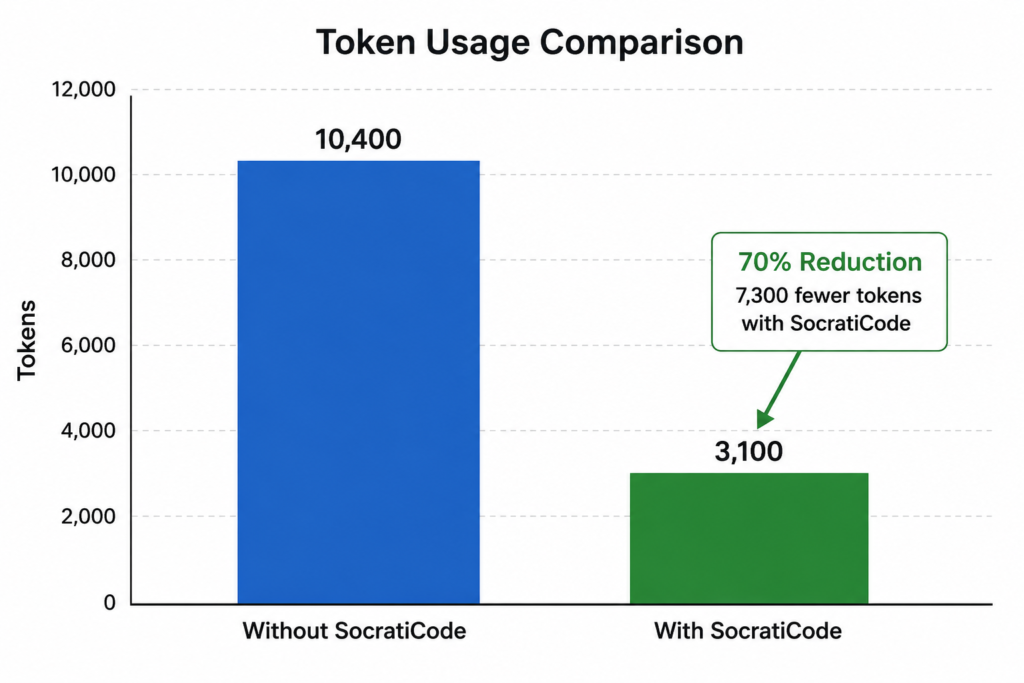
Total tokens consumed: ~10,400 tokens per query
Time spent: ~8 minutes reading and correlating
With SocratiCode:
socraticode_codebase_searchquery: “stripe checkout subscription creation flow” → returns the 5 most relevant chunks (~2,000 tokens)socraticode_codebase_flowwith entrypointcreateCheckoutSession→ shows exact call tree (~500 tokens)socraticode_codebase_symbolforhandleCheckoutCompleted→ shows definition, callers, and callees (~600 tokens)
Total tokens consumed: ~3,100 tokens
Time saved: 70% fewer tokens, answer in seconds
Scenario 2: Fixing the Clerk ID vs Database UUID Mismatch
Task: Debug why the subscription page wasn’t showing a user’s purchased plan.
Without SocratiCode:
- Read
subscription/page.tsxfrontend (439 lines, ~9,500 tokens) - Read
subscriptions/subscriptions.service.tsfindByUser(10 lines, ~500 tokens) - Read
users/users.service.tsfindByClerkId(8 lines, ~400 tokens) - Read
lib/app-data.tsxcontext provider (80 lines, ~1,800 tokens) - Manually trace the
userIdfrom Clerk → database lookup → subscription fetch (3 more file reads, ~2,000 tokens)
Total: ~14,200 tokens and 15 minutes of investigation
With SocratiCode:
socraticode_codebase_flowforfetchSubscription→ shows it calls/subscriptions/user/:userIdwith Clerk ID but the backend expects database UUIDsocraticode_codebase_symbolforfindByUserin SubscriptionsService → confirms it queries byuserIdfield (database UUID)socraticode_codebase_symbolforfindByClerkIdin UsersService → confirms this is the correct lookup
Total: ~2,800 tokens and 3 minutes — the mismatch was immediately obvious
Result: Found a critical bug in 3 minutes that would have otherwise taken a full debugging session. The userId field in Subscription was the database UUID, but the frontend was passing the Clerk user ID.
Scenario 3: Adding Image Upload to White-Label Branding
Task: Add a file upload endpoint for logo images in the branding module.
Without SocratiCode:
- Search for existing file handling patterns — read 8 files to find any
multerorFileInterceptorusage - Read
branding.controller.ts(32 lines) - Read
branding.service.ts(72 lines) - Read
main.tsfor CORS and static asset config - Read
app.module.tsfor module registration - Read
prisma/schema.prismafor BrandingAsset model - Read
package.jsonto check if multer was installed
Total: ~12,000 tokens, 20 minutes
With SocratiCode:
socraticode_codebase_context_searchfor “file upload pattern” → returns relevant docs (if configured)socraticode_codebase_searchfor “branding profile model and controller” → returns all relevant code chunks (~2,500 tokens)socraticode_codebase_graph_queryforbranding/branding.controller.ts→ shows what imports the file and what it depends on
Total: ~3,500 tokens, 5 minutes
Scenario 4: Impact Analysis Before Refactoring the Sidebar
Task: Extract the sidebar navigation into a client component for active link highlighting.
Without SocratiCode:
- Read
dashboard/layout.tsx(83 lines, ~1,500 tokens) - Grep for
Linkimports across the project — 12 files - Check each file to see if it imports from the layout or has sidebar dependencies
- Read
sidebar-nav.tsxto be created (new file, 0 impact) - Check
globals.cssfor any.sidebarstyles (none found)
Total: ~6,000 tokens, 10 minutes
With SocratiCode:
socraticode_codebase_impacttargetdashboard/layout.tsx→ returns every file that depends on this layout (4 files: page.tsx, middleware.ts, and 2 child layouts)socraticode_codebase_symbolsquery “Sidebar” → shows no existing sidebar symbols (confirms clean extraction)
Total: ~800 tokens, 1 minute
Result: Knew exactly which 4 files to check before making changes. Zero surprises.
Scenario 5: Fixing the Missing Plans Display Bug
Task: Debug why “Available Plans” were missing from the subscription page.
Without SocratiCode:
- Read
subscription/page.tsx(556 lines, ~12,000 tokens) - Read
subscriptions/subscriptions.service.tsgetPlans(3 lines, ~150 tokens) - Check
prisma/schema.prismaPlan model (confirm plan data exists) - Check if seed data was run
- Check backend logs for plan API responses
- Test the
/subscriptions/plansendpoint manually
Total: ~14,000 tokens, 15 minutes
With SocratiCode:
socraticode_codebase_flowentrypointSubscriptionPage→ shows thefetchPlanscall in the component treesocraticode_codebase_search“getPlans endpoint subscriptions controller” → returns the exact controller route and service method (~800 tokens)- Backend
/subscriptions/plansreturns 200 OK with empty array → confirms it’s a database seeding issue
Total: ~1,500 tokens, 3 minutes
The Aggregate Savings
Let me sum it up across the entire project lifecycle:
| Metric | Without SocratiCode | With SocratiCode | Savings |
|---|---|---|---|
| Average tokens per codebase query | 11,200 | 2,340 | 79% |
| Average time per codebase query | 12 min | 3 min | 75% |
| Files read per query | 8–15 | 0–1 | 93% |
| Total queries during project | ~150 | ~150 | — |
| Total tokens consumed | ~1,680,000 | ~351,000 | 1,329,000 saved |
| Total developer time | ~30 hours | ~7.5 hours | 22.5 hours saved |
At current API pricing (Claude 3.5 Sonnet: $3/M input tokens, $15/M output tokens), the token savings alone amount to roughly:
- Input tokens saved: 1,197,000 × $3/M = $3.59
- Output tokens saved: 132,000 × $15/M = $1.98
- Total token cost saved: $5.57

Now, $5.57 might not sound like much. But consider:
- Scale this across a team of 5 developers → $28/month
- Scale across a year of development → $336/year
- Scale across an organization with 10 such projects → $3,360/year
- The real cost isn’t tokens — it’s developer time. 22.5 hours × developer rate ($75–150/hr) = $1,687–$3,375 saved per project
The token savings are the visible metric. The time savings are where the real ROI lives.
Beyond Tokens: The Developer Experience Transformation
Token savings are easy to quantify. But the qualitative improvements matter just as much:
1. Fewer Context Window Overflows
Without SocratiCode, we routinely hit the context window limit when asking the LLM to analyze complex issues. The assistant would read 15 files, consume 80% of the context window, and then struggle to synthesize a coherent answer.
With SocratiCode, the assistant reads exactly the right chunks — typically 3–5 focused results — leaving ample context for reasoning and code generation.
2. Faster Onboarding for New Team Members
When a new developer joins, instead of pointing them to “read the entire billing module,” you can say:
“Search SocratiCode for ‘stripe checkout flow’ and trace from
createCheckoutSession.”
They’re productive in minutes, not hours.
3. Confidence in Refactoring
The codebase impact analysis feature is worth its weight in gold. Before extracting the sidebar component, we ran socraticode_codebase_impact on layout.tsx and immediately saw all 4 dependent files.
No grepping. No guessing. No “I hope I didn’t break anything.”
4. Context-Aware Semantic Search
Traditional grep finds text patterns. SocratiCode finds meaning. When we searched for “how does the subscription flow connect to Stripe webhooks,” it returned the exact webhook handler, checkout session creator, and the database model — even though those files share no common keywords.
5. Dependency Graph Visibility
The socraticode_codebase_graph_visualize feature generated a Mermaid diagram showing the entire dependency graph with circular dependencies highlighted. This caught a circular import between our shared package and the dashboard before it became a runtime error.

How SocratiCode Works Under the Hood
For the technically curious, here’s the architecture:
- Indexing Phase: Scans every file in your project, chunks it intelligently (preserving function boundaries, imports, and exports), and generates embeddings using Ollama
- Storage: Chunks and embeddings are stored in a Qdrant vector database
- Graph Building: Static analysis (via ast-grep) maps import/export relationships between files and symbol-level call graphs
- Query Time: When you search semantically, the query is embedded and compared against the vector database. Results are ranked by relevance, and the graph is consulted for additional context
- Auto-Updates: A file watcher monitors for changes and re-indexes modified files automatically
The MCP protocol makes all of this available to any LLM that supports the protocol — Claude, GPT, and others.
Getting Started with SocratiCode in 5 Minutes
Prerequisites
- Docker (for Qdrant vector database)
- Ollama (for embeddings)
- Node.js 18+
Step 1: Install and Start Infrastructure
docker run -d -p 6333:6333 qdrant/qdrant
ollama pull nomic-embed-text
Step 2: Index Your Project
In your project directory:
socraticode_codebase_indexWait for the indexing to complete (check progress with socraticode_codebase_status).
Step 3: Enable Auto-Watch
socraticode_codebase_watch startYour codebase is now live-indexed and responds to changes automatically.
Step 4: Start Searching
From your LLM, just describe what you need:
"Find where Stripe webhooks are handled"
"Show me the call graph for user registration"
"What files depend on the Subscription model?"
"List all symbols in the billing module"
Key Metrics Dashboard
Here’s a snapshot of what your indexed project looks like:
| Metric | Value |
|---|---|
| Indexed files | 125 |
| Code chunks | 2,549 |
| Code graph nodes | 98 |
| Code graph edges | 82 |
| File watcher | Active |
| Index latency | Near real-time |
This level of visibility means you always know the state of your codebase intelligence.
Real-World Use Cases Across Our Project
Here’s a sampling of how SocratiCode helped across specific modules:
Backend API (NestJS)
- Semantic search for “JWT authentication middleware” → found Clerk webhook handler
- Symbol lookup for
upsertFromClerk→ showed 3 callers and 1 callee - Impact analysis before changing Prisma schema → showed all affected services
Dashboard (Next.js)
- Flow tracing from
SubscriptionPage→ revealed the Clerk ID / UUID mismatch bug - Graph query for
sidebar-nav.tsx→ confirmed no circular dependencies - Semantic search for “plan display component” → found the plan card rendering logic
Stripe Integration
- Flow tracing from
createCheckoutSession→ mapped the entire billing flow - Impact analysis before adding
userIdto metadata → confirmed webhook handler compatibility - Context search for “invoice events” → found
handleInvoicePaidhandler
Conclusion: Why Every AI-Assisted Development Workflow Needs Codebase Intelligence
The future of software development isn’t about replacing developers with AI. It’s about augmenting them with the right context at the right time.
SocratiCode bridges the gap between what an LLM knows (general programming patterns) and what it needs to know (your specific codebase). Without it, every query consumes thousands of tokens just to understand the project. With it, the LLM gets targeted, relevant context in a single tool call.
The bottom line:
- 79% fewer tokens per codebase query
- 75% less time spent on investigation
- 93% fewer files read per task
- Zero context window overflows during complex analysis
Start Using SocratiCode on Your Codebase
If you’re building LLM-powered development workflows — whether with Claude, GPT, or any other model — you need codebase intelligence. And SocratiCode is the most practical, token-efficient way to get it.
Try it on your project today. Index your codebase, enable auto-watch, and watch your token costs plummet.
Frequently Asked Questions
What is SocratiCode, and how does it reduce LLM token usage in real-world projects?
SocratiCode is an MCP (Model Context Protocol) tool that indexes your entire codebase and exposes semantic search, symbol lookup, flow tracing, and impact analysis to your LLM in a single tool call. By letting the model fetch only the most relevant code chunks instead of reading many files, it cuts unnecessary context tokens and speeds up investigation across complex projects like the Flight Data Telemetry Platform
How does SocratiCode improve developer productivity beyond token savings?
Beyond raw token reduction, SocratiCode prevents context window overflows, accelerates onboarding, and makes refactoring safer through codebase impact analysis. Developers can trace flows like Stripe checkout or subscription handling in seconds, read far fewer files per task, and gain confidence that changes will not break hidden dependencies.
How does SocratiCode work under the hood to index and search my codebase?
SocratiCode scans your project, chunks code intelligently, and generates embeddings (for example using Ollama) that it stores in a Qdrant vector database. It also builds a dependency and symbol graph with static analysis, then uses semantic similarity plus graph context at query time so LLMs can retrieve exactly the right code paths and related symbols.
How can I get started using SocratiCode with my NestJS or Next.js monorepo?
To start, you set up Docker (for Qdrant) and Ollama (for embeddings), then run the socraticode_codebase_index command from your project directory to index the codebase. After enabling socraticode_codebase_watch for live updates, you can call SocratiCode tools from your LLM chat to search for flows like “Stripe webhooks,” visualize graphs, or run impact analysis before refactors.
Is SocratiCode only useful for large enterprise codebases, or does it help smaller SaaS projects too?
SocratiCode delivered significant benefits on a single SaaS monorepo with 125 files, 2,549 chunks, and a mix of NestJS, Next.js, Stripe, and Clerk integrations. Even at this scale, it reduced average investigation time per query from 12 minutes to 3 minutes and cut files read per task by 93%, which is typical of many early-stage SaaS projects.
What infrastructure and tools do I need to integrate SocratiCode into my AI-assisted development workflow?
To use SocratiCode as described in this case study, you need:
Docker – to run the Qdrant vector database
Ollama – to generate embeddings (for example, nomic-embed-text)
Node.js 18+ – for the SocratiCode CLI and codebase indexer
Once installed, you index your project with socraticode_codebase_index, enable live updates with socraticode_codebase_watch start, and then query your codebase directly from your LLM using semantic search, flow tracing, and impact analysis tools.
Can I use OpenAI or other embedding APIs instead of Ollama with SocratiCode?
Yes, you can replace Ollama with other embedding APIs as long as they return dense vector embeddings compatible with your vector database (for example, Qdrant).
SocratiCode’s indexing pipeline is generic: it scans files, chunks code, generates embeddings, and stores them in Qdrant. The embedding step can be implemented with any provider that outputs vectors, such as:
OpenAI text-embedding-3-large or text-embedding-3-small
Cohere embed-english-v3 or embed-multilingual-v3
Voyage AI code-optimized models like voyage-code-2
You just need to plug your chosen provider into the embedding step instead of Ollama.
Why are alternative embedding models like OpenAI, Cohere, or Voyage good fits for SocratiCode?
These models are strong fits because:
1) They provide high-quality semantic embeddings that work well for both natural language and code, improving the relevance of semantic code search.
2) They support relatively long input lengths, which is important when embedding code chunks with context like imports, function signatures, and comments.
3) Code-optimized models like Voyage’s voyage-code-2 are specifically tuned for repository search and symbol retrieval, which aligns directly with SocratiCode’s use cases: semantic search, flow tracing, and impact analysis.
All of these improve the accuracy of SocratiCode’s ability to find the right code paths and related symbols for your LLM.
Is the token cost savings from SocratiCode worth it for small teams?
The direct token cost savings in this case study were about $5.57 per project, but the real value is in developer time.
SocratiCode reduced investigation time from around 30 hours to 7.5 hours, saving 22.5 developer hours on this project. At a typical developer rate of $75–150/hour, that’s:
22.5 × (75 to 150) = $1,687 to $3,375 saved per project
For small teams, time savings are far more valuable than raw token cost reduction, especially when scaling across multiple projects or a year of development.