This is not a guide to building agents from code. It is a guide to putting agents to work on your team, in five steps.
Every team I talk to has “tried AI.” Very few have deployed an AI agent that ships work every day. The difference is not the model, the budget, or the tools. It is a process: most teams adopt AI as a toy, not as a teammate. This guide shows how to deploy AI agents in 5 proven steps, the same sequence we used to put real agents on our own team at visibility.so. If you are new to the concept, start with what agentic SEO is before diving into deployment.
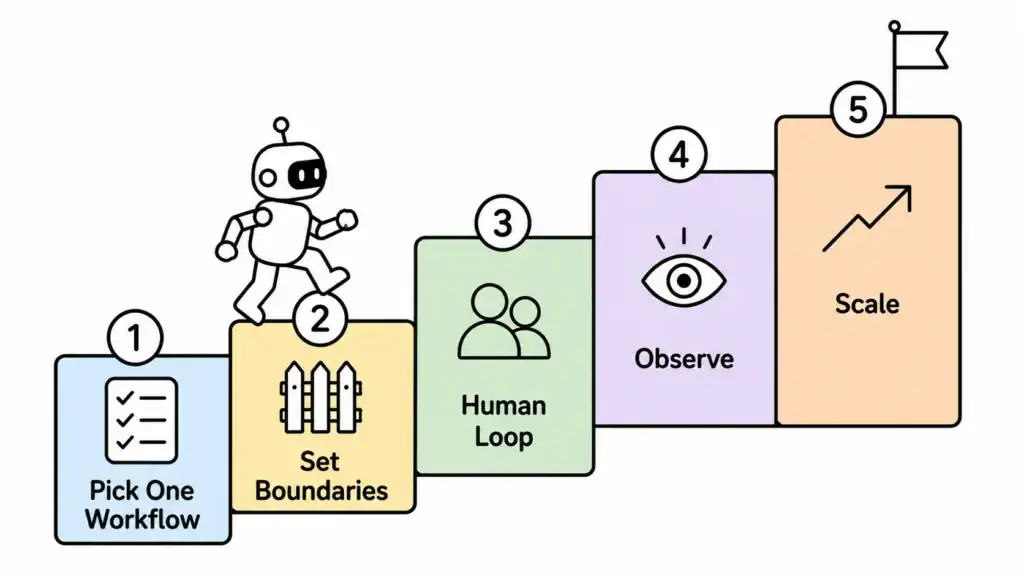
Quick answer: To deploy AI agents successfully, pick ONE repetitive workflow, define strict boundaries for the agent, design a human review loop, make every action observable, and measure one metric before you scale to more agents. Skip any step and you get a demo, not a teammate.
Why Most Agent Deployments Fail
The biggest failure mode is scope. Teams try to give an agent “everything”: content, SEO, support, analytics. The agent does none of it well, the human loses trust in a week, and the experiment dies quietly.
The second failure mode is trust. Agents execute fast, and fast without boundaries feels dangerous. So the human hovers, the agent slows down, and the whole point disappears.
The third failure mode is invisibility. When you cannot see what the agent did, why it did it, or what it cost, you cannot improve it. You are flying blind, and eventually you land the plane.
None of these are technology problems. They are deployment problems, and they are fixable.
Manual Work vs Copilot vs Deployed Agent
| Dimension | Manual | Copilot (assists you) | Deployed agent (works for you) |
|---|---|---|---|
| Who does the work | You | You, with suggestions | The agent, with your approval |
| Output per day | Fixed by your hours | Your hours + speed boost | Runs while you sleep |
| Needs supervision | Always | During the task | At approval gates only |
| Scales to more work | No | Slightly | Yes, add agents |
| Risk of drift | None | Low | Needs boundaries and review |
| What you measure | Tasks done | Tasks done | Output, quality, cost |
Step 1: Pick One Workflow
Choose the highest-repetition, most-measurable task you do every week. Not the most impressive task. The most boring one.
For us, that was technical SEO auditing. It took days manually, followed a repeatable sequence, and produced a clear deliverable. We automated technical SEO audits with agents and the agent now runs the audit in 47 minutes instead of 3 days. Same checklist, same output format, a fraction of the time.
The test for a good first workflow: you can define it in one sentence, it has a fixed output, and you can count the result. If you cannot count it, you cannot deploy it.
Step 2: Set Boundaries
An agent needs a job description and a set of rules. Write both down before you switch anything on.
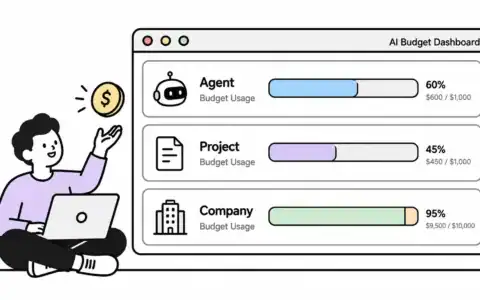
Decide what the agent can touch, what it can never touch, how much it can spend, and who approves what. Our agents have explicit budgets and permissions. They can draft, research, and stage work. They cannot publish, delete, or spend beyond their allowance without approval.
Boundaries are not distrust. They are how a fast worker stays safe. Anthropic’s guidance on building effective agents makes the same point: start narrow, give the agent clear tools, and expand only as you verify. My own first deployment followed this pattern when I built a company brain agent for our startup.
“Agents are best for tasks where flexibility and model-driven decision-making are needed.” – Anthropic’s engineering guidance on agents
Step 3: Design the Human Loop
The agent does the work. The human owns the outcome. That split only works with a review gate.
Our pattern: agents research, draft, and stage changes. A human reviews and ships. Nothing goes live without an approval. This keeps quality high and trust intact, and it means the agent never learns to cut corners because the gate catches everything. The same loop scales whether you run one agent or a whole multi-agent engineering team.
The review gate is also where the human learns what the agent is good at. After a few weeks you will approve faster, reject less, and know exactly which tasks to hand over next.
Quick question: Do review gates slow things down?
Answer: The first week, yes. After that, no. Reviewing a staged output takes minutes. Doing the whole task manually took hours. The gate is the cheapest quality control you will ever buy.
Step 4: Make Every Action Observable
If you cannot see it, you cannot trust it, and you cannot improve it.
Every agent action should produce a log: what it did, why, how long, what it cost. We review agent runs like we review code: what changed, was it correct, can we repeat it?
Observability is what turns a black box into a tool. When something goes wrong, and it will, the log tells you where. When something goes right, the log tells you what to standardize.
Step 5: Measure, Then Scale
Pick one metric per agent. Not three. One.
For the audit agent, the metric is audit turnaround time. For a content agent, it could be drafts approved per week. For a research agent, it could be citations per report. Whatever it is, write it down before the agent starts, and track it weekly.
Only add agent number two after agent number one has a number you trust. That is the discipline most teams skip, and it is why most agent programs stall. OpenAI’s agent development guide reinforces the same idea: evaluate the agent’s performance against concrete criteria before expanding its scope.
Scaling means replicating a proven pattern, not adding chaos.
Challenges and Mitigations
Challenge: “I am worried the agent will make mistakes.”
It will. Every worker does. The mitigation is the review gate from Step 3 plus a log from Step 4. Mistakes become visible, cheap, and fixable instead of silent and expensive.
Challenge: “AI agents cost too much.”
Start small. A focused agent on a simple model costs a few dollars a month in our experience. Our company brain agent, which handles daily operations for the whole team, runs on a budget most teams spend on coffee. Cost grows only when you scale what already works.
Challenge: “Our team will not trust the output.”
Trust comes from consistency. Run the same workflow with the same checklist for two weeks, review every output, and show the team the pass rate. The agent earns trust the same way a new hire does: by being reliable.
Challenge: “What if it drifts from what we want?”
Drift is a boundaries problem, not an AI problem. Tighten the job description, add a rule, and re-review. Our agents get recalibrated after every review cycle. That is maintenance, not failure.
Off-Page AI Trust: Agents Build Visibility
There is a second payoff to deploying agents: AI visibility. When your site demonstrates real agent usage, structured workflows, and consistent entity signals, AI assistants find it easier to retrieve and cite you.
In our tracking across four AI engines, content from sites with clean structure and consistent branding appeared more often in answers. Deploying agents does not directly change rankings, but the discipline it forces (clear processes, observable output, consistent identity) is the same discipline AI engines reward. To understand why, see how GEO vs AEO vs agentic SEO fit together, and the mechanics of how AI search engines work.
Where visibility.so Fits
visibility.so is not an SEO tool. It is an operating system for hybrid human+AI teams. You hire AI agents into your team, assign them to projects, give them budgets, and let them execute while you approve and guide.
That is exactly the 5-step pattern in this post, productized: pick a project, set the agent’s permissions, review its work, watch its runs, and measure what it delivers. Our own team runs this way today, with agents handling technical audits, content research, and operations under human oversight. It worked for us first, and it is the same loop anyone can run.
Frequently Asked Questions
How long does it take to deploy an AI agent?
Plan for two to four weeks for the first agent: one week to define the workflow and boundaries, one to two weeks of supervised runs, and a week of measurement before you trust the numbers.
Do I need a technical team to deploy AI agents?
No. If you can write a job description, you can define an agent’s scope. The technical setup is handled by platforms and tools that manage permissions, budgets, and logs for you.
Which tasks should I automate first with AI agents?
Pick the task you repeat most often with a fixed output: reporting, auditing, research, drafting, data entry. The more measurable the output, the easier the deployment.
How much does it cost to run AI agents?
A single focused agent can run for a few dollars a month. Costs scale with usage, so start narrow and measure before expanding.
Are AI agents safe to give access to?
Yes, with boundaries. Define what the agent can touch, what it can never touch, and who approves what. Approval gates keep a human in control of anything irreversible.
Will AI agents replace my team?
No. Agents handle repetitive execution while humans own judgment, relationships, and outcomes. The teams that win are hybrid: humans and agents working with clear roles.
What is the difference between a copilot and a deployed agent?
A copilot assists you while you work. A deployed agent works autonomously within boundaries and hands output to you for approval. One amplifies you, the other works for you.
Conclusion
Deploying AI agents is a management discipline, not a technology project. Pick one workflow, set boundaries, keep a human in the loop, make everything observable, and measure before you scale. We followed these 5 steps and now run agents that do real work every day, and you can too. Start with the one task you repeat most, and let the agent earn your trust one approved output at a time. For the broader picture of where this fits, see what agentic SEO is and how it differs from traditional approaches, or start with how AI search engines actually work.