How I Built a $0 Multi‑Agent Engineering Team with Paperclip and OpenClaw
I used to run my entire content process in one long AI chat thread. At first, it felt productive, but once I started publishing regularly for my personal brand, everything became messy and hard to track.
One thread had strategy notes, another had draft text, and another had publishing tasks. Deadlines slipped because there was no clear ownership, and I had to rely on memory to keep things moving. I did not need another shiny tool. I needed a better operating model that I could run for 0$.
So I built a small “multi‑agent engineering team” using Paperclip as the control layer and OpenClaw to extend the agent workflows – running on my own stack with no extra SaaS cost. In this write‑up, I’ll show you exactly how I structured it.
Why I Moved Beyond a Single AI Chat?
My recurring problem was not writing quality. It was a coordination quality.
Questions like:
- Who owns what right now?
- What is blocked?
- What is ready to move forward?
- Who follows up when work stalls?
Without clear answers, the process depends on memory and manual follow‑up. That does not scale if you are publishing multiple pieces per month while running a full‑time engineering role or company.
I wanted a system where I could see, at a glance, which part of my content pipeline was stuck and why – without paying for another project management tool.
The Tooling: Paperclip, OpenClaw, and Friends (for $0)
Here is the stack I use:
- Paperclip as the orchestration and issue/agent manager.
- OpenClaw as the self‑hosted multi‑agent system running on my own infra.
- Claude, Codex, and others as underlying models, wired into Paperclip/OpenClaw.
If you saw my earlier write‑up on OpenClaw, this is the continuation of that journey: Self‑Hosted AI Agent on AWS. The key is that all of this runs on infrastructure I already pay for, so I can operate this workflow for effectively 0$ extra.
Step 1: Treat Content Like Engineering Work
I stopped thinking of “content creation” as a single task and started treating it like engineering execution.
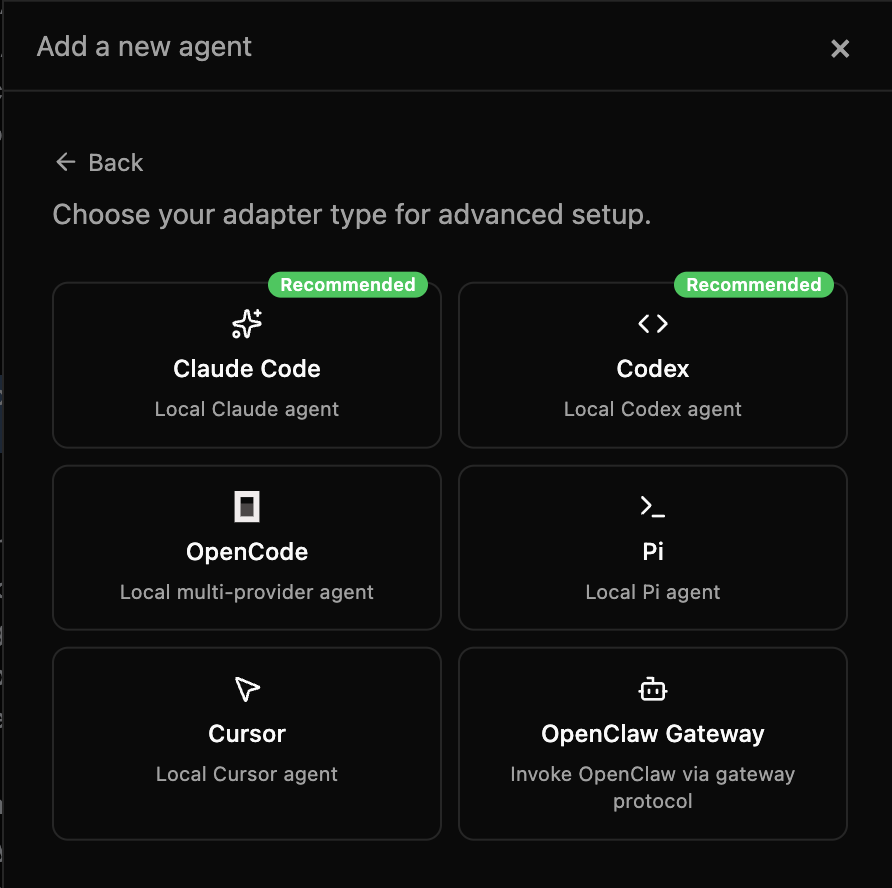
Instead of one assistant doing everything, I split responsibilities into clear roles:
- Personal Assistant (PA): coordination and final accountability.
- Content owner: draft creation and rewriting.
- Brand owner: narrative, positioning, and voice.
- Digital presence owner: CMS, formatting, and publishing readiness.
Each role owns a specific part of the pipeline, and every task runs through issue states: todo, in_progress, blocked, done. This makes progress and blockers visible immediately.
Step 2: Define Agents and States in Paperclip
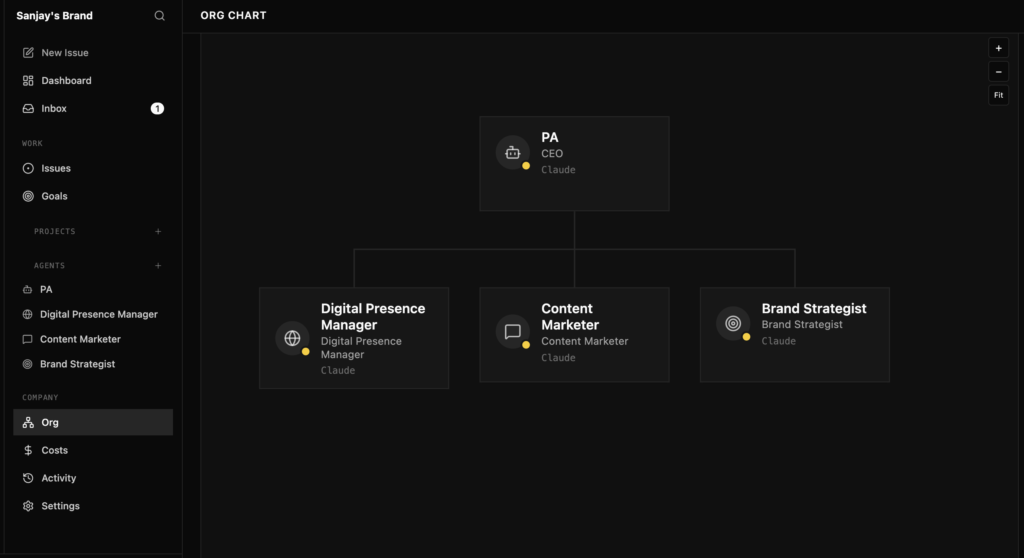
In Paperclip, I defined agents to match those roles and connected them to OpenClaw and the underlying models. Each agent has:
- A clear responsibility (“own the draft”, “own the brand narrative”, “own the publish step”).
- Access rules and context (which systems or notes they can see).
- A set of issues states they can move work through.
For every piece of content, I create one or more issues and move them through a simple state machine:
done: ready for the next role or ready to publish.
todo: scoped and ready to be picked up.
in_progress: currently being worked on by one agent.
blocked: waiting on input, decisions, or upstream work.
This looks simple, but that visibility is what makes the system work.
Step 3: A Practical End‑to‑End Flow
Here is the actual flow I use for a typical article like this one:
- Define deliverables first
I start by defining the outcome: “A case study‑style post showing how I built a $0 multi‑agent engineering team using Paperclip and OpenClaw.” - Create separate tasks for writing, positioning, and publishing
I create different issues for “outline and draft”, “brand alignment and polish”, and “CMS formatting and publish checklist”. - Assign owners explicitly
The content owner agent takes the outline/draft, the brand owner agent takes the positioning and tone, and the digital presence owner takes the publishing task. - Require checkout before execution
In Paperclip, I make sure only one agent “owns” an issue at a time. This avoids confusion, especially when I jump in manually. - Track updates in comments with a clear next action
Every time an agent or I touch an issue, we leave a short comment: what changed, what is missing, and what the next action is. - Trigger fallbacks when needed
If something is blocked for too long – like a draft that is stuck on review – I switch to fallback mode and either prompt a different agent or step in directly to move it forward.
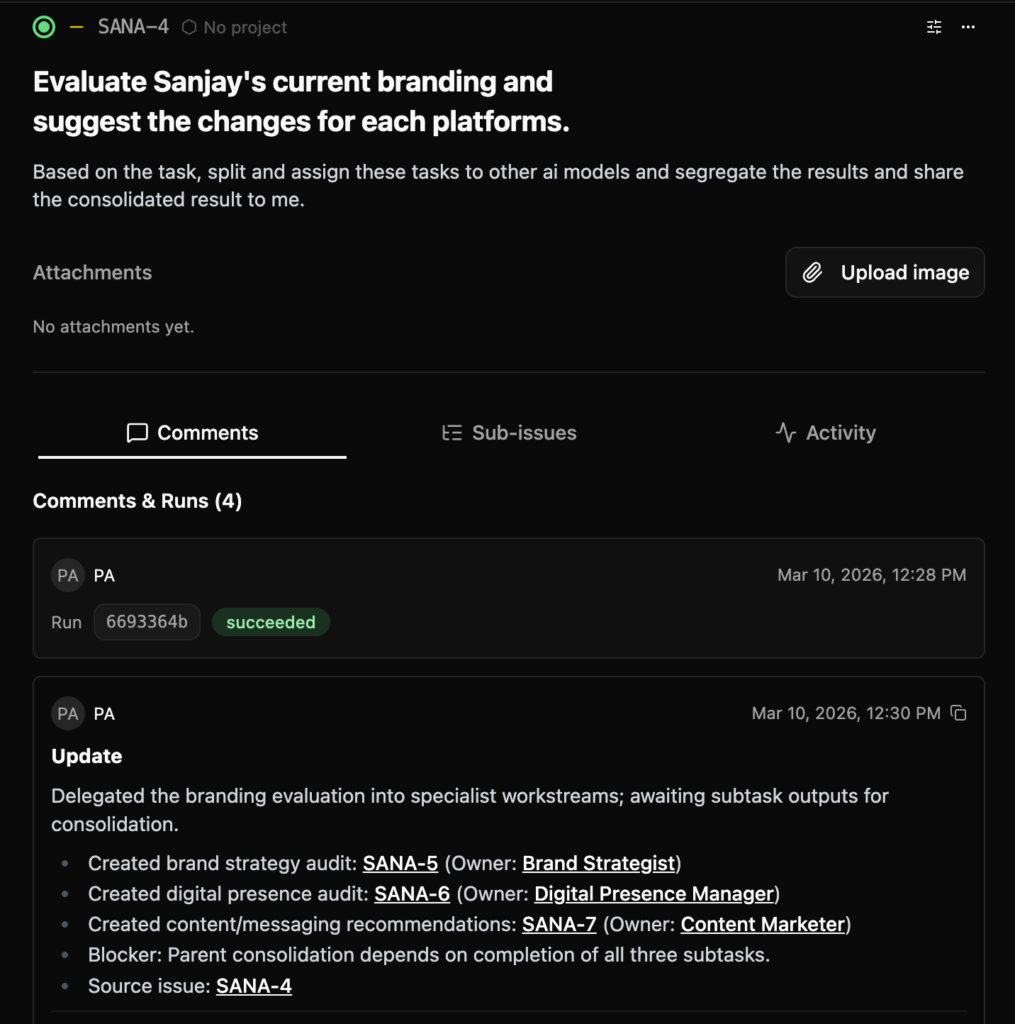
This makes process clarity non‑optional. I can look at Paperclip and instantly see which part of the pipeline is holding up a publish.
Step 4: What Happened in Real Execution
In real life, delegation is messy. Some delegated tasks did not start on time. Parent execution got blocked, and the whole chain stalled.
The difference now is that I treat “fallback” as a first‑class pattern:
- If an agent or automation does not move within a set time, I reassign or take over.
- I never let an issue sit in a fuzzy “almost done” state.
- I prefer shipping an 80% perfect post with clear learning over waiting for a hypothetical 100%.
This turned stalled workflows into shippable ones. The system is resilient instead of just looking impressive in diagrams.
Outcomes: What improved for me?
After shifting to this multi‑agent workflow, three things improved:
- Clarity
Everyone (including future‑me) can see who owns what and which state each issue is in. - Reliability
Blocked work is visible early, so I can decide whether to wait, nudge, or trigger fallback. - Brand consistency
Because the “brand owner” is a defined role, narrative and tone are intentional, not accidental. I can ship more technical posts without diluting the message.
Most importantly, I now publish content from real implementation experience – not generic AI commentary. And I am doing it with infrastructure and tools I already pay for, so the marginal cost of this “AI engineering team” is effectively 0$.
Security Lessons from Letting Agents Near Publishing
Once agents and automations come near your CMS or production systems, security discipline matters.
A few practices I follow:
- Use least privilege for all accounts involved in publishing.
- Avoid sharing credentials in broad channels or prompt histories.
- Rotate secrets periodically, especially after big publish cycles or automation changes.
- Keep operational logs and simple approval trails so you can answer “who did what, and when?”.
Good workflow design is not only about speed. It is also about trust and safety.
Final Thought
If you are trying to build a personal brand around real technical work, treat your content pipeline like a system, not a one‑off writing task.
A clear multi‑agent process, backed by tools like Paperclip and OpenClaw, gives you consistency, faster recovery when things break, and better output over time – without needing to add another expensive SaaS subscription. For me, that combination of structure and 0$ marginal cost has been the biggest win.
Frequently Asked Questions
How can I build a multi‑agent workflow for $0?
You can run a $0 multi‑agent workflow by using open‑source orchestration (Paperclip) and a self‑hosted multi‑agent system (OpenClaw) on infrastructure you already pay for, instead of adding new SaaS tools just for coordination.
Do I need to be a developer to use Paperclip and OpenClaw for content?
Some technical comfort helps, but you mainly need to understand how to define agents, issue states, and simple flows; once the initial setup is done, most day‑to‑day use is creating issues, assigning owners, and moving them through states.
How does Paperclip orchestrate multiple AI agents?
Paperclip orchestrates multiple AI agents by assigning them to issues, enforcing clear states (todo, in_progress, blocked, done), and routing work between agents based on rules and ownership.
What is the difference between Paperclip and a normal project management tool?
Unlike a traditional project management tool, Paperclip is built to coordinate AI agents directly, so agents can pick up issues, change states, and leave updates, instead of relying only on human users.
What role does OpenClaw play alongside Paperclip?
OpenClaw runs the underlying multi‑agent system, while Paperclip acts as the orchestration and issue layer that decides which agent should act when, and how work moves between them.
Is Paperclip suitable for non‑content multi‑agent workflows?
Yes, the same orchestration model – agents, issues, and states – can be applied to other domains like support, research, or internal tooling where multiple AI agents need coordination.
How do I keep multi‑agent orchestration safe when connecting it to my CMS?
Use least‑privilege access, route publishing actions through specific “digital presence” agents, and keep approval steps and logs inside Paperclip so you can review every change pushed to your CMS.
thanks sanjay